Link to local files #879
Link to local files #879
Conversation


 azul
force-pushed
the
enh/link-to-files
branch
2 times, most recently
from
azul
force-pushed
the
enh/link-to-files
branch
2 times, most recently
from
3bcae6a to
0e48993
Compare

|
Here's a little demo of the basic functionality: |
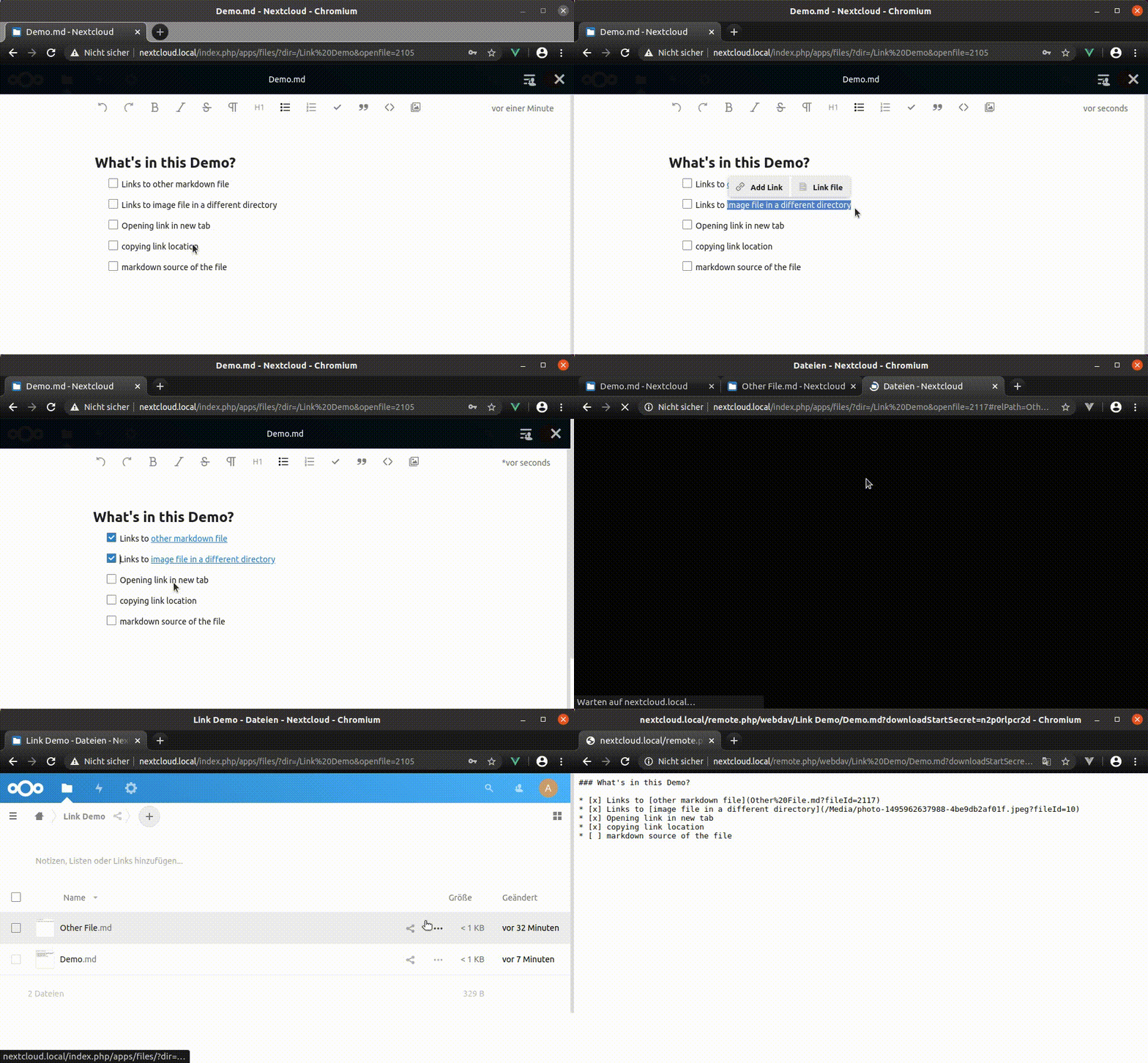

|
I think this is enough for a first PR. Things that i know are missing:
I'd be happy to see this merged as is. But maybe i can get to some of those before a review is ready. |

|
Wow, amazing contribution ❤️ I'll give this a detailed review later, the general approach seems all good to me.
Might be that those two are things we need to fix in viewer or the files app. |

| if (query.dir && fragment.relPath) { | ||
| const filename = fragment.relPath.split('/').pop() | ||
| const path = `${query.dir}/${filename}` | ||
| OCA.Viewer.open({ path }) |
There was a problem hiding this comment.
This does not have the fileId as a fallback.
Sharing may lead to different directory layouts for different users.
If the calculated path is wrong for the current user... there is no way for the Viewer to recover from that.
We could find out the right path by looking up the exact file path by fileid.
But that adds complexity and another roundtrip.
This is an optimization to open links more smoothly then with window.location.
So it would be nice to avoid the roundtrip.
Not sure what the best approach here is.
There was a problem hiding this comment.
Hm, I'm also not sure what to do in that regards.
|
@juliushaertl You are right about the history navigation. There's no nextcloud/viewer#497 is an attempt to move in that direction. |
|
@azul Just a sidenode to make the rebasing process a bit easier, feel free to not commit the bundles until it is approved, and then we just add them right before the merge. |

 juliusknorr
left a comment
juliusknorr
left a comment
juliusknorr
left a comment
There was a problem hiding this comment.
Some minor comments to the code, otherwise fine to get this in as a first step 👍
azul
force-pushed
the
enh/link-to-files
branch
2 times, most recently
from
ea01a65 to
d02a594
Compare
|
@juliushaertl I rebased everything and added the regex fix you proposed. |

|
Wow @azul, that is amazing! Especially the linking to other markdown files – it’s the Hypertext! :) |
|
@juliushaertl I rebased again. I think i addressed your comments. Please approve or let me know what else is missing. Thanks 😃 |
|
By the way @azul, we have a chat channel "Text team" on our Nextcloud Talk instance. I can invite you for a guest account via your email address if you like? :) |
@jancborchardt, please do 😃 |

Tries both approaches: from the menu bubble and the menu bar

Menu bubble works quite well so far.
Only uses absolute paths.

Menu bar uses relative paths.

Pass filepath to Menu bubble so it cat
* start there
* calculate relative paths

Move the logic for relative paths to helper.

Make all strings translateable.

Render relative links properly.
The way we do this for img tags serves as an example.

Signed-off-by: Azul <azul@riseup.net>
Since the menu bubble deals with links
it makes more sense to add the button here.

Moved it to the initial part of the menu bubble
as an alternative to the link form.

Hand current path to menu bubble and use it
* to start from there when picking the file to link to
* to calculate the relative path.

Signed-off-by: Azul <azul@riseup.net>
The short relative links used in markdown
need to be converted to working urls in the href attributes.

In order to properly serialize the content
the full urls in html need to be converted to relative links as well.

This commit splits out the href handling into a new helper.
This way it can be easily tested.

Signed-off-by: Azul <azul@riseup.net>
The markdown we create for links to local files looks like this:
```
[Check this out!](subdir/file.md?fileid=123)
```

Turn this into a link like this
```
<a href="?dir=/current&openfile=123&relPath=subdir/file.md">
  Check this out!
</a>
```

The `relPath` part of the url is needed
to convert it back to the original markdown.

Includes a test.

Next steps:
* open links to local files in same tab.
* change dir param according to relative Path.

Signed-off-by: Azul <azul@riseup.net>
When navigating between different text documents
one does not expect to open new windows all the time.

Next steps:

* open in new tab on middle click.

Signed-off-by: Azul <azul@riseup.net>
also take into account `ctrl` keys.

Use the href from html rather than markdown.
This is an actual link that will work in nextcloud.

Signed-off-by: Azul <azul@riseup.net>
Signed-off-by: Azul <azul@riseup.net>
rather than opening a completely new page

Signed-off-by: Azul <azul@riseup.net>
This way they also work if the viewer was opened from other apps
than the file app.

Also move the `relPath` param into the fragment.
It is only used to remember the relative path
for generating the short markdown form from the link.

Signed-off-by: Azul <azul@riseup.net>
Signed-off-by: Azul <azul@riseup.net>
This used to be working but was broken
by having full hrefs rather than just the query part.

Now we check if the domain remains the same
and if we have a `dir` param in the query
and a `relPath` param in the fragment.

This should be a pretty good check for links
that we can open in the viewer right away.

Signed-off-by: Azul <azul@riseup.net>
Signed-off-by: Azul <azul@riseup.net>

make sure there are decimals in the fileId

Co-authored-by: Julius Härtl <jus@bitgrid.net>
Signed-off-by: Azul <azul@riseup.net>
azul
force-pushed
the
enh/link-to-files
branch
from
f9be824 to
aa7fc93
Compare
This is more relyable then parsing the window location query for dir:
* ?dir does not change when navigating between files right now
* ?dir is not present when the viewer is used from within other apps.

We used to fallback to the viewer state which solved the latter.
However it is easier and less error prone
to just rely on viewer state in the first place.

Signed-off-by: Azul <azul@riseup.net>
azul
force-pushed
the
enh/link-to-files
branch
from
aa7fc93 to
e955b5a
Compare
|
/compile / |
|
Cypress failures are unrelated. |

Signed-off-by: npmbuildbot[bot] <npmbuildbot[bot]@users.noreply.github.com>

|
Linking to a docx file leads to an "There is no plugin available to display this file type" Error with OnlyOffice installed. |
|
@jochenstu I created a new issue for this so it does not get lost here. |
That is also the format proposed for the nextcloud text app
in nextcloud/text#879.

This commit changes the router-links in the nav.
It also works with links created by NC text
but it will open them in new tabs
because that is what tiptap does by default.

|
Great work so far! So the case that a file is moved is allready mentioned, but what if the file is copied? Is it possible to link a file with unknown id while the relPath (including file name) is known? Thanks for your help! |
|
@kevinde91 I am not sure i understand the situation you are describing. Let me try to rephrase what i understood:
Now the link will still point to Another thing we were discussing was allowing the creation of links to yet to be created files:
Is that what you were talking about?
|
|
@azul thanks for the fast reply, and sorry for the confusion. I tried to recreated my problem and this time it behaved exactly how it should:
Sorry again for wasting your time, not sure what I did wrong yesterday. |


Summary
Add a button to the menu bubble that links to local files.
See #308 for descriptions of the approach.
Fix creating links in workspace (currently uses wrong url for- also seems to be an issue with imagesPROPFIND)